System automatically enters sleep after waking from sleep
Windows Vista and later versions of Windows go back to sleep or hibernate automatically after a specified period of time if you do not touch the mouse or keyboard. The default time is set to 120 seconds.
To change that value, open the REGEDIT tool, then select the following key: HKEY_LOCAL_MACHINE\SYSTEM\CurrentControlSet\Control\Power\PowerSettings\238C9FA8-0AAD-41ED-83F4-97BE242C8F20\7bc4a2f9-d8fc-4469-b07b-33eb785aaca0\DefaultPowerSchemeValues
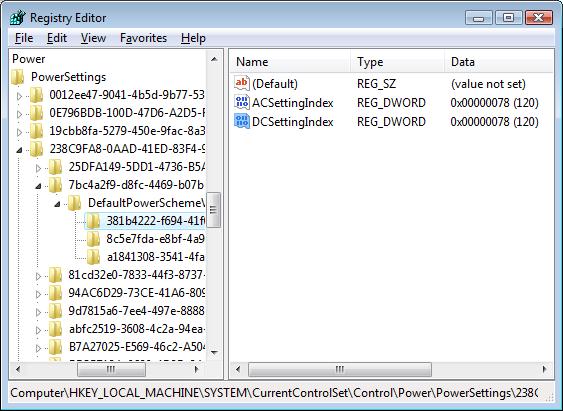
Click the picture to enlarge.
The DefaultPowerSchemeValues key contains three subkeys, which correspond to Balanced, High Performance, and Power Saver options. You need to change the ACSettingIndex and DCSettingIndex values in all three keys. You can either set a period longer than the maximum anticipated duration of the run of the scheduled task (in seconds) or set 0 to turn off this feature.
References
Power Policy Configuration and Deployment in Windows
Categories: Manual, Troubleshooting








Leave a Reply
You must be logged in to post a comment.