Kill process
This scheduled task type allows terminating process.
Process file name
Name of the process to be killed. You can specify either full path to the executable file of the process, or executable file name without path. Wildcards * and ? are supported for filenames.
User name whose processes may be killed
Only processes running in the security context of the selected user will be killed. If you want to kill processes running under current user context, leave this field blank. You can also specify * to kill processes from all users.
Restore minimized window before closing
When you are killing an application that has some unsaved data, it tries to display a prompt for confirmation similar to this:
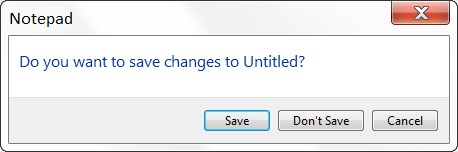
Click the picture to enlarge.
Which causes the application's button on the taskbar to blink. When the option is selected, the application window will be restored, and the prompt for saving unsaved data will be sent to foreground.
Kill process without giving it chance to save data
If this option is selected, Advanced Task Scheduler will kill the process without giving it a chance to save data. If the option is not selected, Advanced Task Scheduler will send window the same message as Windows sends when user clicks the  button on the window title.
Advanced Task Scheduler can terminate only those processes, which have their own windows. If a process does not have its own window, it can be terminated only when the option Kill process without giving it chance to save data is selected.
IMPORTANT:
USE CAREFULLY THE KILL PROCESS FUNCTION. BE SURE THAT BEFORE USING THIS FUNCTION KILLING PROCESS HAS NO UNSAVED INFORMATION. THE PROCESS WILL NOT BE GIVEN THE CHANCE TO SAVE ITS STATE OR DATA BEFORE IT IS TERMINATED. ADVANCED TASK SCHEDULER WILL NOT ASK YOU TO CONFIRM THE PROCESS KILLING.
List all found processes to the log file
Save list of all found processes to the log file.
Returning codes
Error code: Error code of starting the command
Exit code: Number of killed processes
Categories: Manual, Shortcut type








Leave a Reply
You must be logged in to post a comment.