Start tasks with Explorer
Some Windows Explorer features such as My Computer, Recycle Bin, etc. may be started from Advanced Task Scheduler. To do it type "explorer.exe" in the task properties dialog box under Executable file name label and under Command line arguments label type one of the following strings (without quotes). Like this:
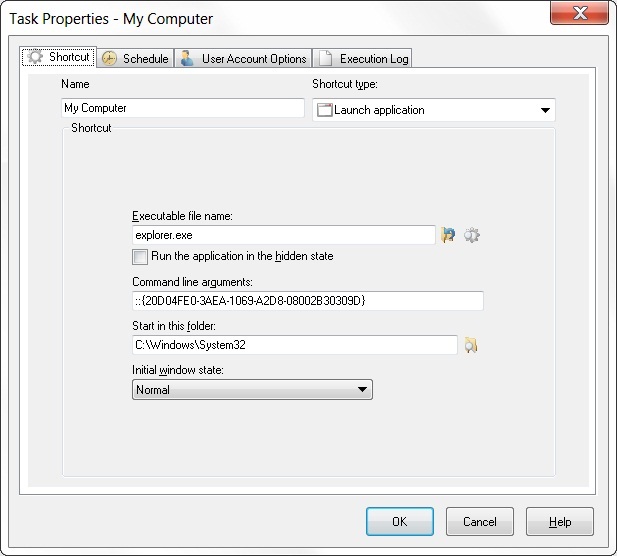
Click the picture to enlarge.
Please copy string (without quotes) from this text to the clipboard and paste it where it should be. Read more about copying from the help topic to the clipboard in the Windows help file.
Note that some function can start only under Windows NT and other functions can start only under Windows 9x.
My Computer
"::{20D04FE0-3AEA-1069-A2D8-08002B30309D}" - opens Explorer Window with My Computer folder.
Network Neighborhood
"::{208D2C60-3AEA-1069-A2D7-08002B30309D}" - opens Explorer Window with Network Neighborhood folder.
Recycle Bin
"::{645FF040-5081-101B-9F08-00AA002F954E}" - opens Explorer Window with Recycle Bin folder.
Dial-Up
"::{20D04FE0-3AEA-1069-A2D8-08002B30309D}\::{992CFFA0-F557-101A-88EC-00DD010CCC48}" - opens Explorer Window with Dial-Up folder.
Categories: Task scheduler








Leave a Reply
You must be logged in to post a comment.